

aiProfile and Schools
Creating Discipleship Training Schools and Upper schools in aiProfile
What is a Location?
In this case a Location is a School, be it a DTS or an Upper School.
You have come to this page as a link to help create schools in your website that students can apply to.
Follow down this page to see how to create schools.

Creating a DTS or an Upper School.
A location is your base, a school, a ministry, an outreach.
Think of a location as being something that People belong to.
SETTING UP LOCATIONS

tes
Complete your Location
Location Account
This name may change, but it is second tab in at the top.
Emails & Newsletters
This name may change, but it is the third tab at the top.

- Within Select an Email & Send, you have a list of preformatted emails, but this feature is much better in People, Registrations, and References.
Next

- Location Newsletter Subscription Information is mostly about assigning a Newsletter to this Location.
- When a person registers for this Location, their registration becomes a subscription to this Newsletter.
- We can cause a Location to be subscribed to a Newsletter, like a DTS is subscribed to an Admin Newsletter, to help the Location's owner (email address) run their Location.
Next
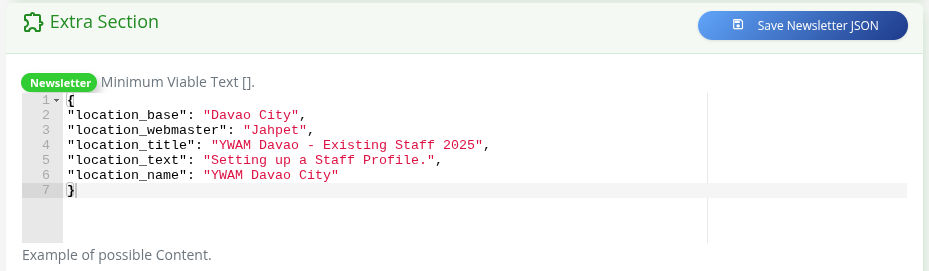
The Extra Section is a programmable area that helps us personalize a Location in the Newsletter Section, Email, and more.
You are the Admin for your website and you want to help your Schools create themselves.
You are doing the job that I do, to help the school leaders get their schools ready for applications.
Here are the things you need to do.
SETTING UP LOCATIONS
Create your Master DTS Location
We want to create a location that is called something like:
2.2 DTSs being run in 2026.
This is a parent DTS location that will hold all the child DTSs.
Things to set up:
- Name: 2.2 DTSs being run in 2026
- email: as the admin, put yours in.
- Can Parent: Yes
- Description:
Dear School Leaders,We would like to promote your Discipleship Training School on your website https://ywamphilippine.org.Please register with this Application so we can gather all the necessary information for your upcoming schools in 2026.We also want to build students' capacity to apply online. So any suggestions and questions would be greatly appreciated.
The Website Team. aiprofile@ywam.life
- Location Type: DTS
- Location Category 1: YWAM DTSs
- Under Idenity / Reports, Can Register: No
- Order: 10
- Dates: No
- Reports: We will deal with this later.
- Email Body: Not needed at this time.
- Under Emails & Newsletters, Newsletters Registrations will be Subscribed to: Add Create a DTS.
- Extra Section:
{
"location_DTS": "DTSs being run in 2026",
"location_name": "YWAM Your Location Name",
"location_website": "ywam-your-site.org",
"location_base": "Your City",
"location_webmaster": "Your Name",
"location_text": "Setting upschools.",
}
There are other things we could do, but we will just keep to this for now.
SETTING UP the newsletter
The Create a DTS Newsletter to go to School Leaders.
We already have the shell of the Newsletters to help a school leaders create their schools for the coming year.
Go to Newsletters -> Filter By -> Create a DTS.
You will see three premade Newsletters.
Open up the first one by clicking on the edit.
- You can change the Name and Description as needed.
- Never change the Newsletter Type.
- The display order is the order in whch the newsletters are sent. Do not change.
- Gap Days is the number of days till the next newsletter is sent.
- You do want Closed set to closed.
- Test to: put in your email address.
- Inputs and Delays. This is very important and would be best handled in a lesson with us.
- https://tca.ywam.life/one-on-one/, you can book training.